PKP · An independent PikPak desktop client Find what to watch.Organize what you keep.

Find titles, save them to your cloud drive, organize files, and keep watching — all in one native window.

v0.1.0 · macOS 12+ · Apple silicon and Intel · Windows preview

PKP Files workspace demo: My Files and media groups on the left, a folder grid in the center, and a cloud drive overview on the right; all accounts and files are fictional
PKP Files workspace Redrawn from the current UI · Fictional demo data

The big picture

Discover and organize,
all in one place.

Discover a title first, pick a release, and save it to your cloud drive; organizing, search, and playback handle every step after that. Before anything changes in your cloud drive, the final call is still yours.

  1. 01

    Discover

    Browse titles in the Marketplace, then check releases in public indexes.

  2. 02

    Save

    Choose an account and folder and hand it to Cloud Add; for torrents, pick files first.

  3. 03

    Organize

    Review the organization plan, then rename, move, or clean up duplicates.

  4. 04

    Play

    Native mpv playback takes over, and your Files page stays right where it was.

Feature / AI Assistant

Review the plan,
then touch the cloud.

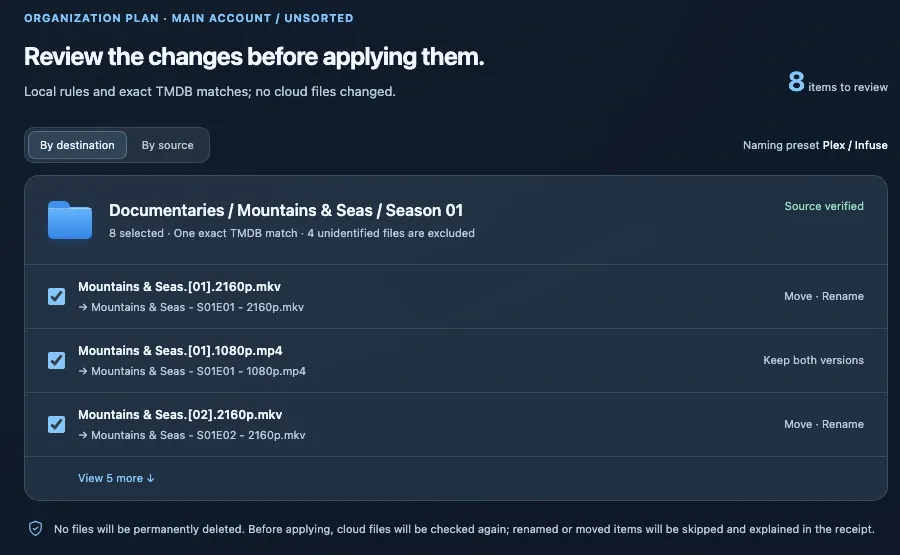
Filename rules and exact title matching suggest how to organize first, so you get a plan even without a model. Check every rename, move, and keep item by item, then run it once you confirm; whole batches can be undone.

AI Assistant plan preview demo: per-item rename, move, and keep suggestions grouped by destination folder
AI Assistant · Plan preview Fictional demo data
Local first

Reads filenames like guessit, then matches title and year exactly with TMDB — a plan without configuring any model.

Plan first

Write operations become cards you can review. Confirm once to run; whole batches can be undone, and nothing is ever deleted permanently.

Your choice of model

DeepSeek, Qwen, OpenAI, Anthropic, OpenRouter, or local Ollama (no key needed); set one up only when you want to chat.

Chat requires configuring your own model and authorizing it to receive file metadata; file contents, subtitles, credentials, and download links are never sent. Screens use demo data.

Feature / Marketplace

Find the title,
then pick a release.

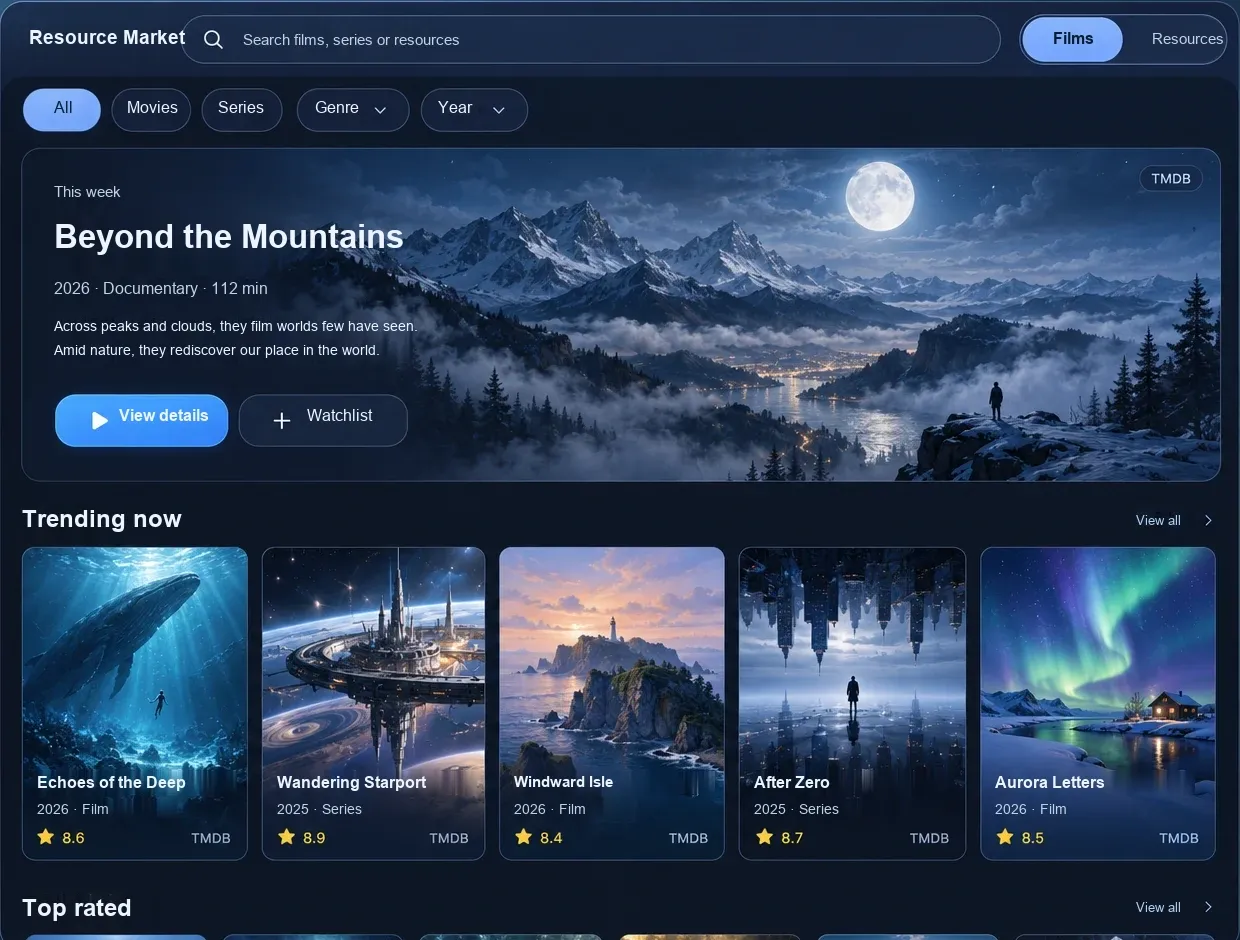
Browse movie and TV info through PKP’s TMDB proxy by default — no key of your own needed — then search public indexes for candidate releases. Matches, possibly related, and mismatches are listed separately, and recommendations cite facts you can verify.

Expand a release to preview its contents; confirm the account and folder before Cloud Add, and optionally create a folder per title.

Marketplace Titles home demo: title filters, a featured spotlight, and a poster grid
Marketplace · Titles Fictional demo assets
Know the title,
then choose.

Filter candidate releases by resolution, subtitles, and more; please verify release details yourself. Creating a Cloud Add task does not mean the content has arrived in your drive.

Marketplace candidate releases demo: release name, size, source, Cloud Add, and file preview
Marketplace · Candidate releases Fictional demo assets

Titles, releases, and ratings shown are demo data.

Native playback

Open it and keep watching.

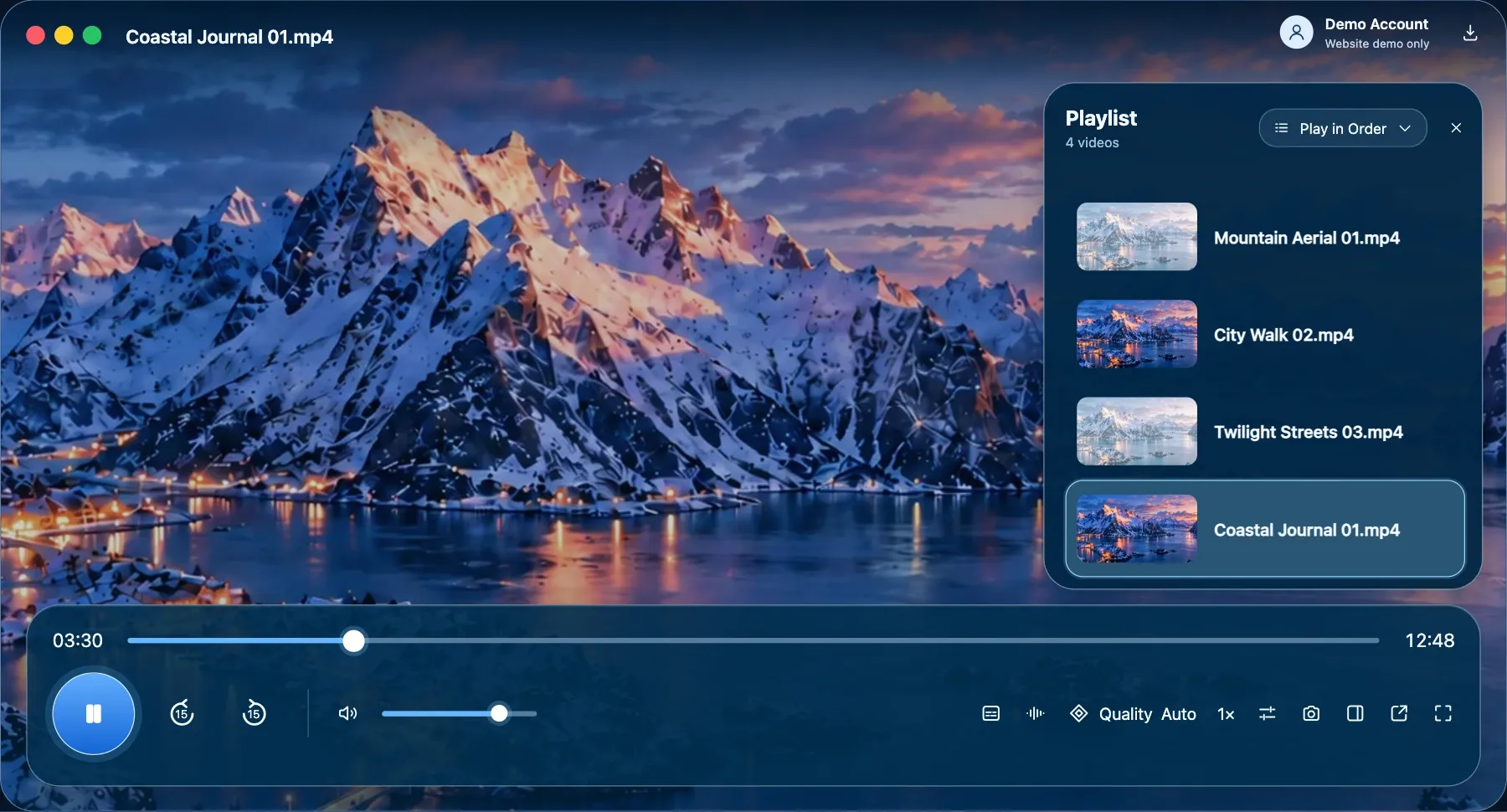
Embedded libmpv renders video natively with mpv — not a web player. MKV, AV1, HEVC, multiple audio tracks, and image-based subtitles play directly, and you can switch to the original quality anytime.

PKP player demo: file info at the top, a floating playlist on the right, and a two-tier control bar at the bottom; video and account are demo assets
Immersive player Redrawn from the current UI · Demo assets
  • Switch quality in placeLists only the qualities the video actually has; after switching, playback resumes from the same spot in about 2–3 seconds.
  • Browse while you watchShrink it to a bottom playback bar or move it into its own window; folder, filters, and selection stay put.
  • Subtitles & audio tracksASS, PGS, and more; adjust subtitle style, subtitle delay, and A/V sync; audio tracks appear as “Cantonese · E-AC-3 5.1”.
  • Continue WatchingMerges cloud and local playback history so you pick up where you left off.

Beyond video

Music and documents look good too.

Audio moves to a listening space, with artwork and tags read from the file and lossless formats labeled accurately; images, PDF, Markdown, and text each get their own viewer. Switching files doesn’t stop what’s playing.

Music playback mockup: artwork, track info, playback controls, and an audio-only queue; demo data
Music playback · MusicMockup · Fictional demo content

On narrow screens, swipe sideways to see the full view.

Files & search

See what’s inside,
then decide.

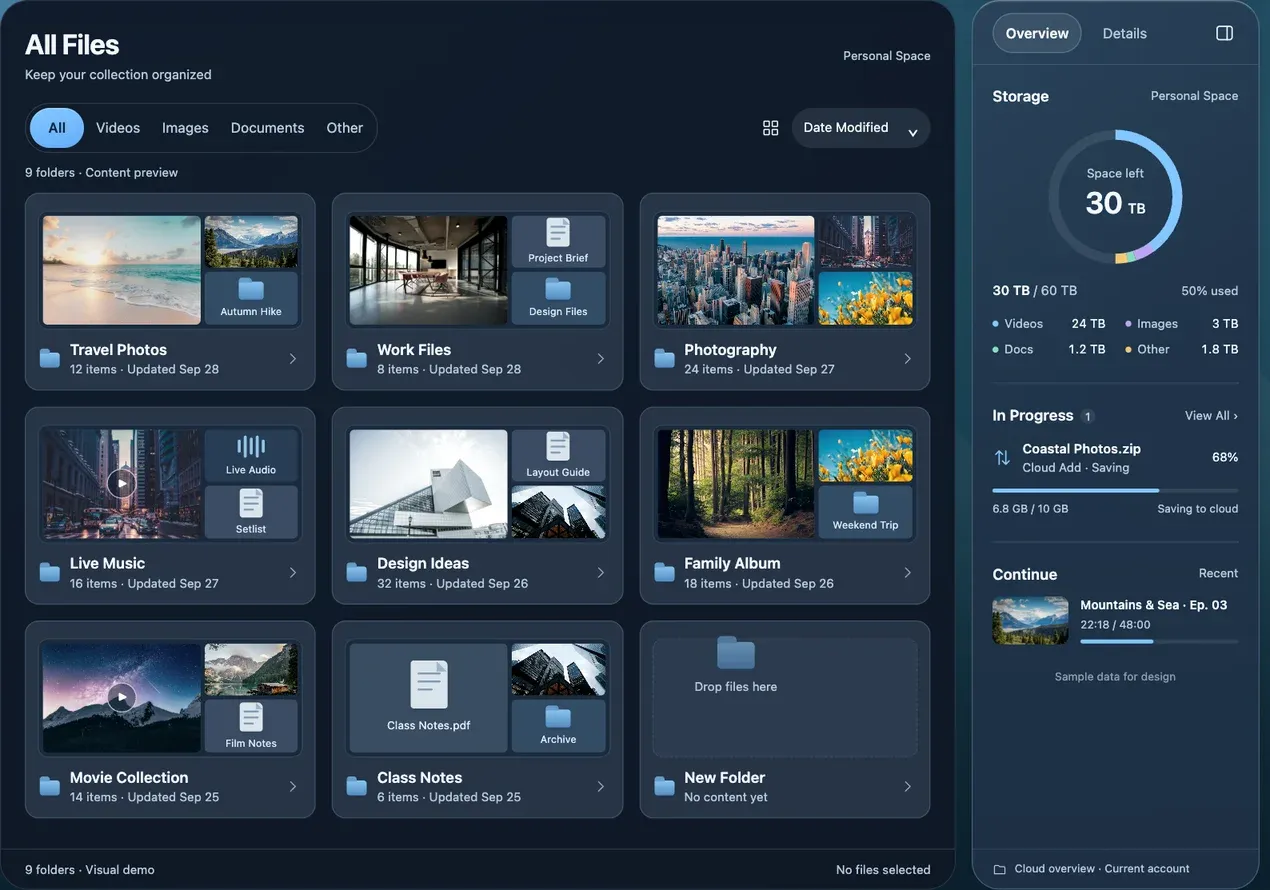
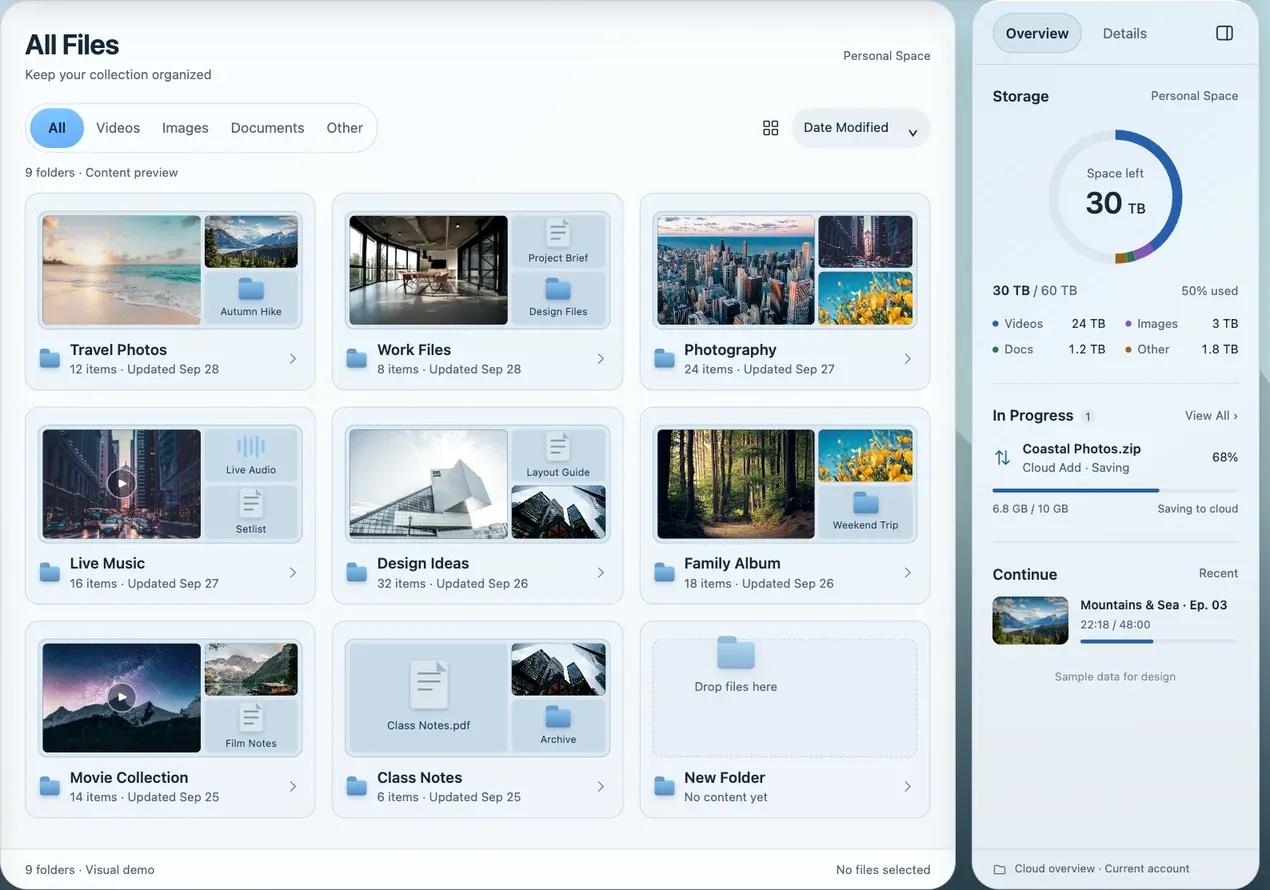
Folder covers show their direct contents, and an always-on side panel shows storage, tasks, and Continue Watching. Each account gets its own local index, so search, filtering, and browsing don’t keep waiting on the server.

Dark PKP Files workspace demo: content covers and an always-on storage overview; folder covers show their direct contents Light PKP Files workspace demo: content covers and an always-on storage overview
Browsing files / Dark & light Demo data · Current workspace layout

Folder content previews

Grid / list and flat view of the whole drive

An info panel always at your side

Find files by conditions — no need to ask AI.

Combine type, size, date, watch progress, and folder in one search; press ⌘K to jump to search anytime.

type:video >1G played:unfinished
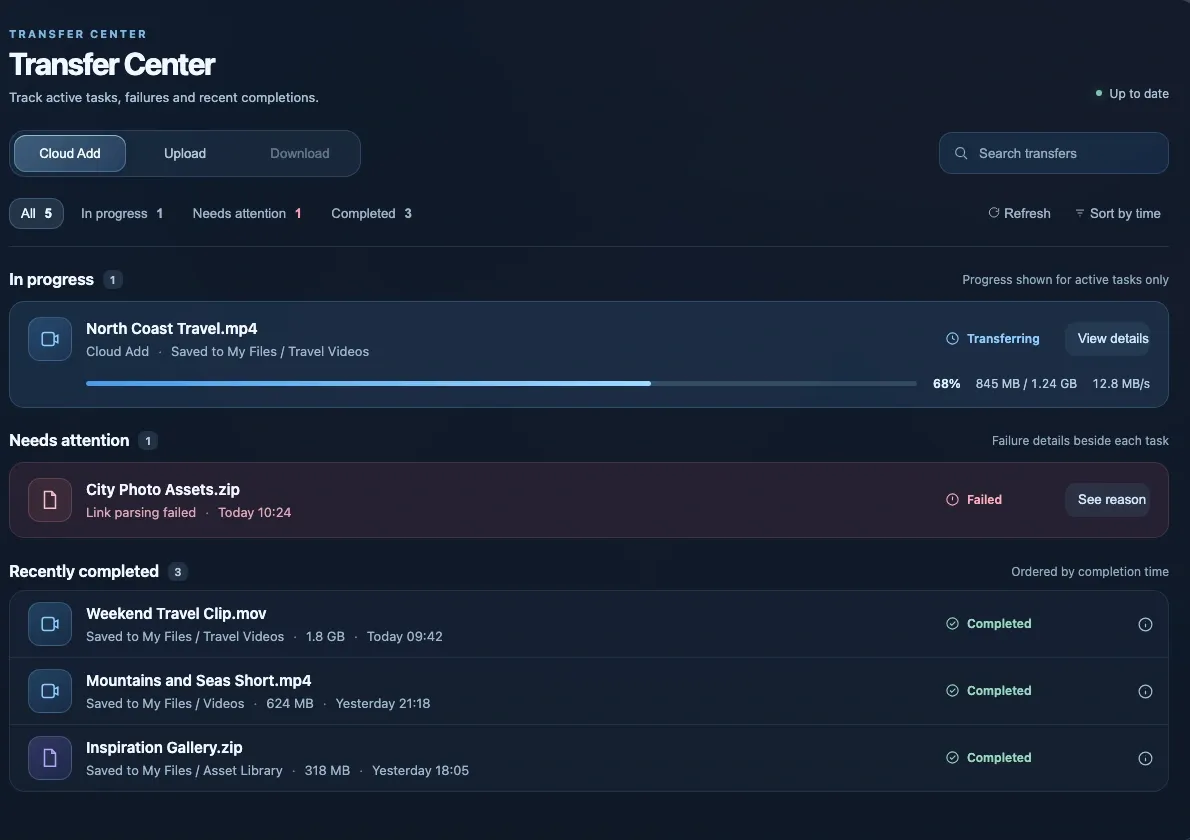
Transfers mockup: tasks grouped into in progress, needs attention, and completed
Transfers UI mockup / Demo data

Transfers & extraction

Tasks keep going.
You don’t wait.

Cloud Add, local uploads, and Download to Computer all live in one list. Pick files from torrents first; uploads resume in chunks, downloads use up to 8 threads in segments and can continue after you quit.

Cloud AddLocal uploadDownload to Computer

Archives, no download needed

Unpack in the cloud,
keep what you want.

Browse the contents of ZIP and RAR files first, then choose what to extract and where to save it; encrypted archives accept a password. The original stays in your cloud drive and takes no space on your computer.

Extract online mockup detail: choosing files inside an archive and a cloud destination folder; demo data
Extract online Mockup detail · Demo data

Cleanup / Local index

Find duplicates,
free up space.

Duplicates are identified by content hash and size together, and one copy per group is kept by default; empty folders are confirmed again before cleanup. Items go to Trash by default — permanent deletion is your choice.

Scans read the local index; if an action would remove every copy in a group, PKP refuses to run it.

Cleanup workspace demo: duplicate groups, reclaimable space, and per-item selection
Cleanup · Duplicates Demo data / Not a real scan result

Multiple accounts & menu bar

Switch accounts up front,
tasks keep running behind.

Each account has its own session, transfer queue, and local index; switching only changes the account in front of you. Close the window on macOS and PKP stays in the menu bar: every account’s progress at a glance, and a reminder before quitting if tasks are running.

Switch Account panel in the PKP sidebar: three demo accounts, the current account, and switch options; all accounts are fictional
Switch Account Redrawn from the current sidebar · Fictional demo data
macOS menu bar panel mockup: still running with the window closed, transfer progress per account, and shortcuts; demo data
Menu bar panel Mockup · Demo data

Privacy & security

Lock the app,
and its data access.

App Lock supports system authentication (Touch ID) or a separate password. While locked, the backend suspends file and account reads, and the window can’t be captured in screenshots; ongoing transfers continue, and video pauses with its progress saved.

  • Credentials stored apartRemembered passwords and keys you enter are stored in the system Keychain; session tokens live in a local file readable only by you.
  • Models need permissionChat sends file metadata only after you configure a model and authorize it — never file contents or credentials.
  • Tokens stay hiddenSign-in tokens appear only in API request headers and the local proxy — never in logs, command lines, or pages.
App Lock settings mockup detail: unlock method, separate password, auto-lock when away, and hide content while locked; demo data
App Lock settings Mockup detail · Demo data

Network & appearance

Fit your network,
make it yours.

Direct, follow system, or a custom HTTP / HTTPS / SOCKS5 proxy — one switch controls all of PKP’s outbound traffic without touching your system VPN or system proxy. Appearance follows the system’s light or dark mode, with six accent colors to choose from.

Network & Proxy settings mockup: direct, follow system, and custom proxy modes, a SOCKS5 proxy server form, and a connection overview; demo data
Network & Proxy Mockup · Demo data

Try the six accent colorsContrast stays at 4.5:1 or higher on both light and dark backgrounds.

Sharing & connections
Create public or password-protected share links; manage WebDAV (Premium required), PikPak’s official MCP access, and personal access tokens.
Make the workspace yours
Light, dark, or follow system; custom wallpaper, reduced transparency, and a compact sidebar; respects the system’s Reduce Motion setting.

Speed, measured in real tasks.

225,000

cloud files indexed locally, about 67 seconds the first time

10–40+ MB/s

8-thread segmented downloads (4.8 MB/s single-threaded)

72 fps

browsing the Files page during playback (25–40 fps before the fix)

1,413

transfer tasks scrolling at about 17 ms per frame

Measured results; actual performance varies by account, device, and network and is not guaranteed.

Download & install

Get your desktop ready.

PKP v0.1.0: full release on macOS, preview on Windows. Download links are coming soon. The macOS build isn’t notarized by Apple; after installing, follow the guide to allow it once.

macOSCurrent full release

Apple silicon and Intel,
one installer.

PKP-0.1.0.dmg · Not notarized by Apple; you need to allow it manually the first time you open it.

Download link coming soon

First-launch guide
System
macOS 12 or later
Chip
Universal: Apple silicon and Intel
Player engine
Bundled libmpv, no Homebrew needed
Account
Your own PikPak account
WindowsPreview

x64 / ARM64

Single combined installer. Video output and Windows Hello haven’t been verified on real Windows hardware yet; remembered passwords, auto sign-in, the menu bar panel, and the web image proxy are not available yet.

Preview not publicly available yet

Source code & licenseAGPL-3.0-or-later

Source code you can actually find.

PKP is open source under AGPL-3.0-or-later. The libmpv / FFmpeg shipped with the installer are LGPL builds, and the matching source archive libmpv-sources.tar.gz is provided alongside.

Source repository coming soon

System requirements, first-launch guide, and Windows differences

There is no Linux build at this time. PKP requires your own PikPak account; available features depend on your account’s plan.

FAQ

Is PKP an official PikPak product?
No. PKP is an independently developed third-party desktop client; you sign in with your own PikPak account.
Do I have to set up an AI model to organize files?
No. Local search, filename rules, and organization plans don’t depend on a model; chat requires configuring your own model, and local Ollama needs no key.
Will the AI read my file contents?
Once you authorize chat, only the metadata a task needs — file names, paths, sizes, and dates — is sent. File contents, subtitles, credentials, and download links are never sent.
Where is my account password stored?
If you don’t check “Remember,” the password is kept only in the running process’s memory; if you do, it’s stored in the macOS Keychain. Sign-in tokens are stored in a local credentials file readable only by you.
Do transfers stop when I close the window?
Not on macOS. PKP keeps running in the menu bar and background transfers for every account continue; if tasks are running when you quit, you’ll be asked first.
Do I need PikPak Premium?
You can start with your own PikPak account. Some features, such as WebDAV management, require Premium; everything else depends on your account’s plan.
Are the Windows and macOS versions the same?
Not yet. The Windows version is a preview build; video on real hardware and Windows Hello are not yet verified. Missing features are listed on the download page.
What if macOS says it can’t verify the developer?
The current disk image isn’t notarized by Apple. First confirm where the installer came from, then allow it using the “First-launch guide” on the download page. Don’t run it directly from the disk image.

PKP / FOR PIKPAK

Spend your time on what you watch.

An independently built PikPak desktop space. From titles and files to transfers and playback — fewer window switches, more time watching.

Download PKP